Blog Comment Helper for Chrome
Stop retyping your name, email and website on every blog you comment on, and stop hunting for the comment box on a layout you have never seen. Save your text once. Open the side panel on the page and the extension finds the comment, name, email and website fields, then fills all four at once. You check it and press submit yourself, or turn on a switch and let it press for you.
- No networking code at all
- No site access asked for at install
- Seven comment systems matched by name
- English, 简体中文, Français
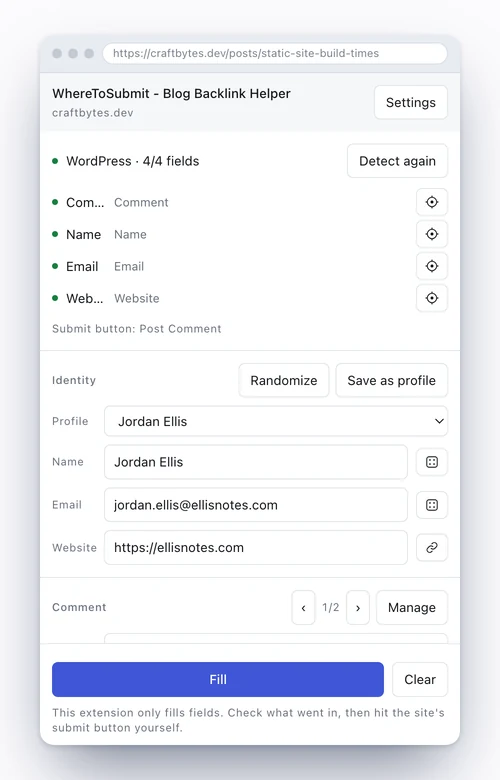
How it finds the form
WordPress, wpDiscuz, Typecho, Z-Blog, Commento, Isso and Waline each have their own rules built in, so they match the moment the panel opens.
Anything else gets scored. The extension reads each input’s id, name, class, placeholder, the label text beside it, its autocomplete hint and its type. The word lists cover Chinese, English, Japanese, Spanish, French and Russian. A page that also holds a search box and a newsletter box will not throw it off, because those two score negative.
Some blogs hide an input that nobody can see. It is there to catch bots. Fill it and the anti-spam plugin throws your comment straight out. So any input that is hidden, has zero size, or has been pushed off screen is skipped.
Disqus and Facebook comments run inside an iframe on someone else’s domain, and no browser lets an extension write into that. When the extension runs into one, it tells you plainly that you have to type it yourself. It does not pretend it worked.
When it picks the wrong field
Every field has a crosshair button beside it. Click the button, then click the input you want on the page. The binding is saved per hostname, so next time you visit that site it is already right.
Identities and drafts
There is a dice button next to the name and the email. Click it for a new one. Names come in three styles: real-looking, handle-style, and lowercase run together. The local part of the email is random letters and digits by default, or it can follow the name.
Put your own domain in the settings so replies still reach you. Leave it blank and the extension uses common mail domains. It never uses example.com or the other reserved domains, because spam filters block those on sight.
Random values come from the browser crypto API, not from a generator someone could guess.
Keep as many drafts as you like and switch with the arrows or the dropdown. If you are about to reuse a draft on a site where you already used it, the extension says so. It records the hostname only, never the full address, the page title, or anything else on the page.
What happens to your data
The extension does not go online. There is no fetch, no XMLHttpRequest, no sendBeacon, no WebSocket, no analytics, no telemetry and no ad SDK anywhere in the code. Everything you save sits in chrome.storage.local and goes away when you uninstall.
It asks for no site access when you install it, so you never get the "read your data on all websites" warning. It looks at a page only after you click the toolbar icon. If clicking the icon every time gets old on a site you use a lot, grant that one site from the panel, and revoke it whenever you want.
About submitting
By default it only fills. Read what went in, then click the site’s own submit button.
There is a switch in the settings, off by default, that adds a Fill and submit button to the panel. It clicks the submit button the extension detected and nothing else. It does not call form submission, it does not fake an Enter key, and it goes grey when the page has a CAPTCHA. Whether you turn it on is up to you.
A few other things
The settings page carries a ready-made prompt. Paste it into any AI and you get back JSON in the right shape. Import that and your drafts are in, with no typing them one at a time, and you can switch between them whenever.
The interface comes in English, 简体中文 and Français, following your browser language by default and switchable in the settings. You can export a JSON backup any time.
Where to leave those comments
The extension fills the form. Finding pages worth commenting on is the other half. Our comment link list collects pages that still have comments open and accept a relevant link, ranked by Semrush Authority Score and filterable by category. The guides cover how each submission site works.
The extension fills fields. Pressing submit is yours by default. The full data statement is in the privacy policy. Extension privacy policy